How DNS Resolution Works
What Happens When You Hit Enter? A Deep Dive into DNS Resolution
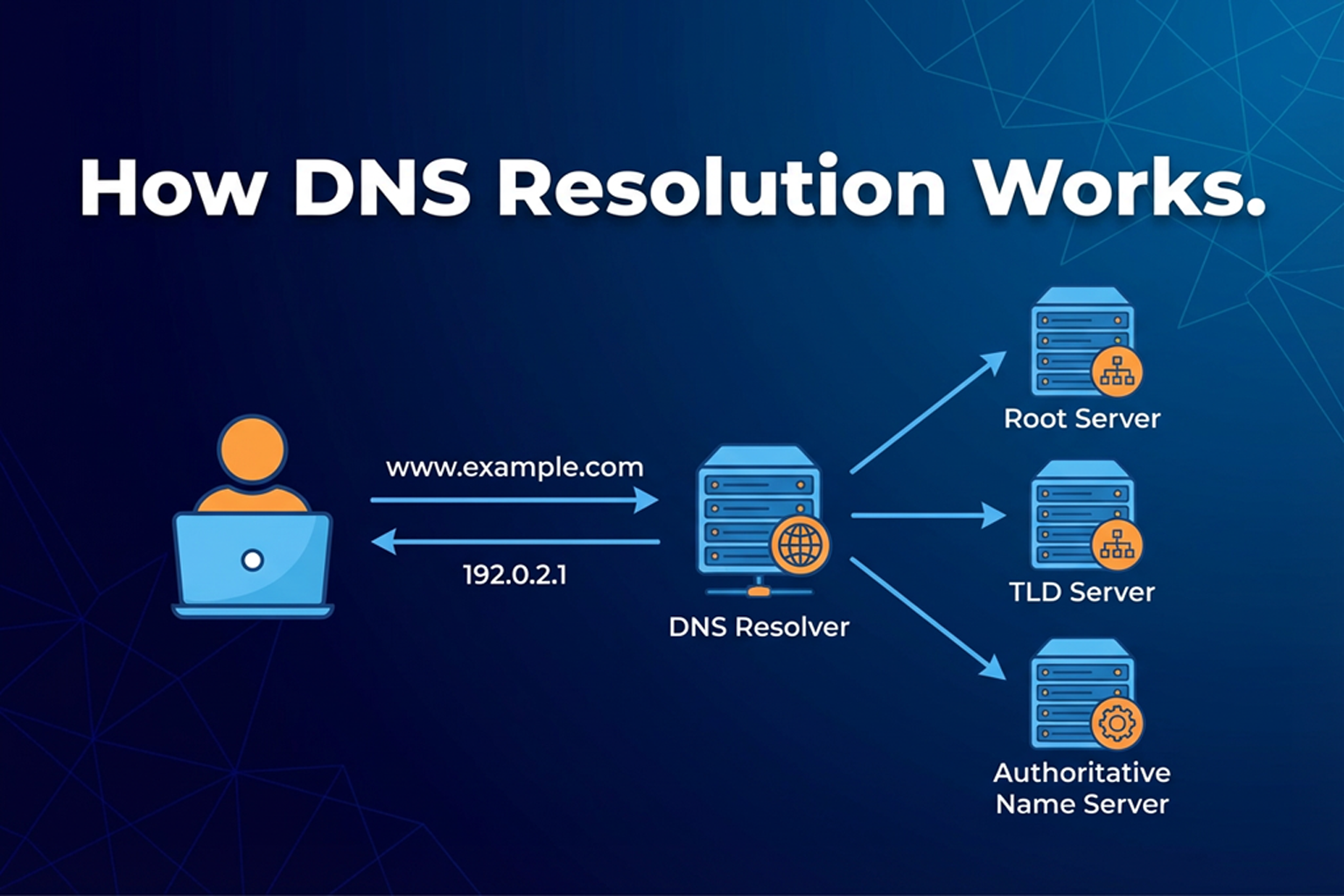
How DNS Resolution Works
When I started learning about how websites work, one question came to my mind:
How does the browser know where google.com is?
We type a name, but computers understand numbers.
That’s where DNS comes in.
I learned this recently, so I’ll explain it in the simplest way possible.
What is DNS? (Internet’s Phonebook)
DNS stands for Domain Name System.
DNS is like the phonebook of the internet.
Humans remember names like
google.comComputers understand numbers like
142.250.183.206
DNS helps convert name → number.
So when we type:
google.com
DNS helps find:
IP address of google.com
Without DNS, we would have to remember IP addresses for every website, which is not practical.
Why Name Resolution Exists
Name resolution exists because:
Names are easy for humans
IP addresses are easy for machines
DNS acts as a translator between humans and computers.
What is the dig Command?
dig is a command used to check and understand DNS.
I learned that:
Browser does DNS quietly in background
digshows DNS steps clearly
So dig is mostly used for:
debugging DNS issues
learning how DNS works
checking name servers
Think of dig as:
“Show me how DNS is answering this question”
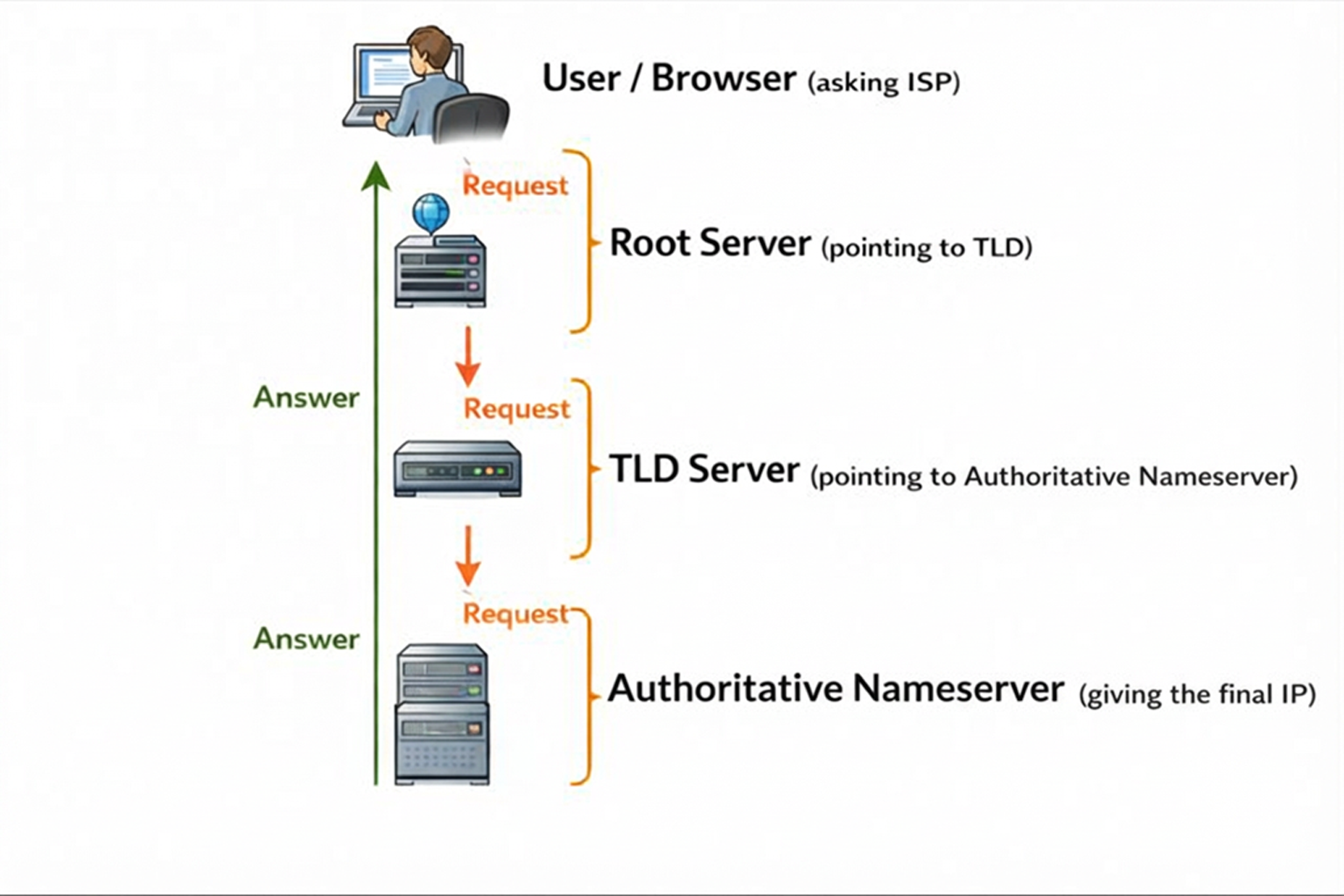
DNS Resolution Happens in Layers
One important thing I learned is that DNS does not work in one step.
It works in layers:
Root Server → TLD Server → Authoritative Server
Each layer knows a little more information.
Root Name Servers (dig . NS)
First step is the root.
Command:
dig . NS
This asks:
“Who manages the root of DNS?”
Root servers:
don’t know IP of google.com
but they know who manages .com, .org, .in, etc
So root servers guide us to the next level.
TLD Name Servers (dig com NS)
Next level is TLD (Top Level Domain).
Command:
dig com NS
This asks:
“Who manages all .com websites?”
TLD servers:
manage
.com,.net,.orgknow where authoritative servers are
still don’t know actual IP
So they say:
“Ask these servers for google.com”
Authoritative Name Servers (dig google.com NS)
Now we go deeper.
Command:
dig google.com NS
Output:
; <<>> DiG 9.10.6 <<>> google.com NS
;; global options: +cmd
;; Got answer:
;; ->>HEADER<<- opcode: QUERY, status: NOERROR, id: 35302
;; flags: qr rd ra; QUERY: 1, ANSWER: 4, AUTHORITY: 0, ADDITIONAL: 1

;; OPT PSEUDOSECTION:
; EDNS: version: 0, flags:; udp: 512
;; QUESTION SECTION:
;google.com.            IN    NS

;; ANSWER SECTION:
google.com.        5702    IN    NS    ns1.google.com.
google.com.        5702    IN    NS    ns2.google.com.
google.com.        5702    IN    NS    ns4.google.com.
google.com.        5702    IN    NS    ns3.google.com.

;; Query time: 75 msec
;; SERVER: 8.8.8.8#53(8.8.8.8)
;; WHEN: Tue Jan 27 16:40:54 IST 2026
;; MSG SIZE  rcvd: 111
This asks:
“Who is the final authority for google.com?”
These authoritative servers:
belong to Google
store real DNS records
know the correct IP address
This is the most trusted source.
Full DNS Resolution (dig google.com)
Now the final step.
Command:
dig google.com
OutPut:
; <<>> DiG 9.10.6 <<>> google.com
;; global options: +cmd
;; Got answer:
;; ->>HEADER<<- opcode: QUERY, status: NOERROR, id: 15437
;; flags: qr rd ra; QUERY: 1, ANSWER: 1, AUTHORITY: 0, ADDITIONAL: 1

;; OPT PSEUDOSECTION:
; EDNS: version: 0, flags:; udp: 512
;; QUESTION SECTION:
;google.com.            IN    A

;; ANSWER SECTION:
google.com.        264    IN    A    142.250.193.142

;; Query time: 54 msec
;; SERVER: 8.8.8.8#53(8.8.8.8)
;; WHEN: Tue Jan 27 16:38:11 IST 2026
;; MSG SIZE  rcvd: 55
This gives:
IP address of google.com
response time
TTL (how long cache is valid)
This is the answer browser actually needs.
How All This Works Together
Here’s the full flow I understood:
Browser asks resolver
Resolver asks root server
Root says: ask .com server
.com server says: ask Google’s server
Google’s server gives IP address
Browser connects to that IP
All this happens in milliseconds.
What are NS Records and Why They Matter
NS records tell:
“Which server is responsible for this domain?”
They matter because:
DNS is distributed
no single server knows everything
responsibility is divided
NS records help DNS stay:
fast
reliable
scalable
What Recursive Resolver Does (Behind the Scenes)
Our browser usually talks to a recursive resolver (ISP or Google DNS).
This resolver:
performs all the steps for us
talks to root, TLD, authoritative servers
caches results to speed things up
So browser just asks:
“Give me IP for google.com”
Resolver does the hard work.
Connecting This to Real Browser Requests
When you type:
https://google.com
Browser does:
DNS resolution (using resolver)
Gets IP address
Connects to server
Fetches webpage
DNS is always the first step.
Final Thoughts (My View)
Earlier DNS felt like magic.
Now it feels like a well-organized system.
For me:
DNS = asking the right people in the right order
If you understand:
root
TLD
authoritative servers
You already understand DNS basics.
I’m still learning, but now DNS doesn’t scare me anymore. I think I’m in this rabbit hole now.


